Brief Intro
By Dumziii Mofolo on
This blog post is an example of a User Interface and User Experience website analysis , paying attention to the pros and cons
Website used an example for analysis:
other types of meat that it offers and prides itself in. This analysis wll use the heuristic approach by Miklos Philips which also focuses particularly on how website designs adhere to Interaction Design Principles.
Pros:
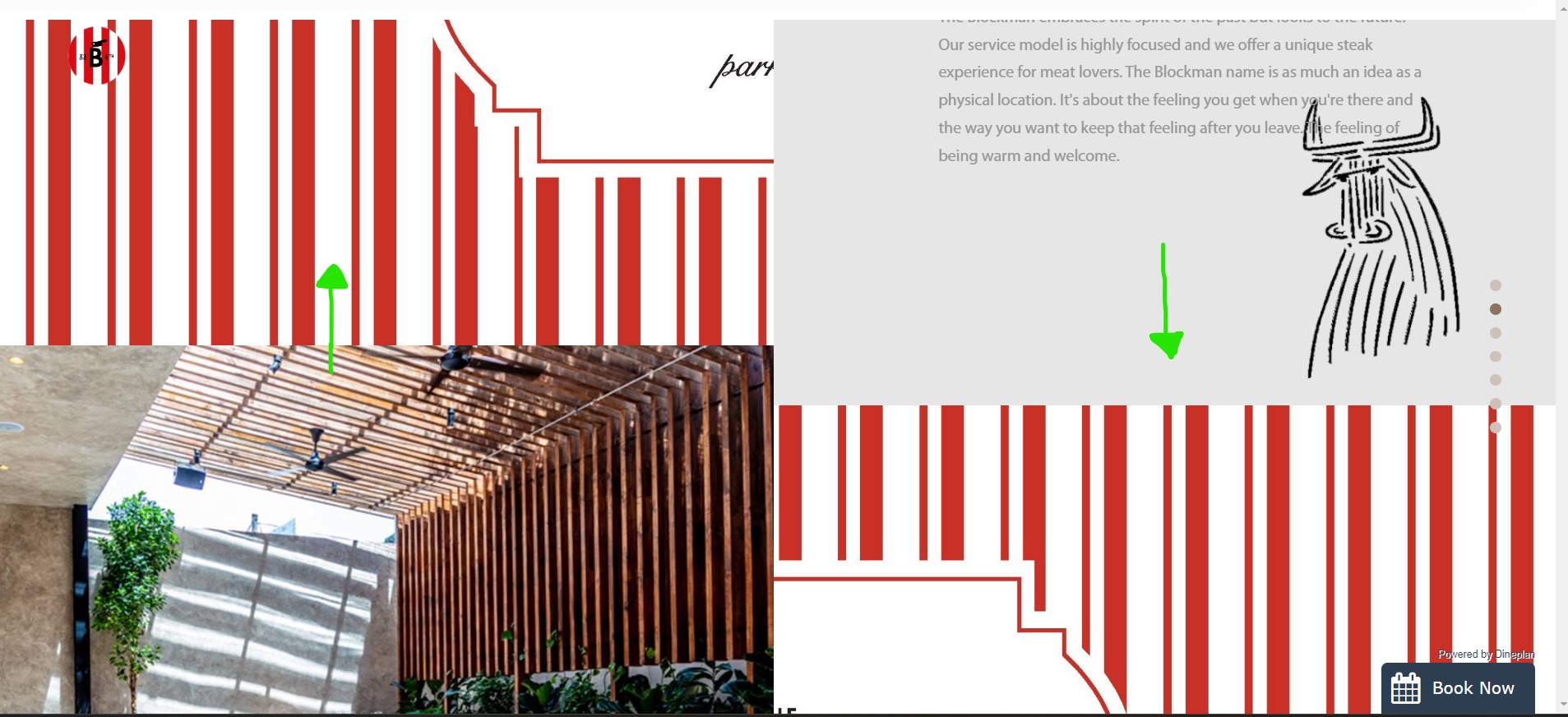
This website provoides a very interesting and uniwue navigation experience that I've noted not many websites use. It uses the mouse scroll wheel as its main tool for users to use to move along and traverse their website. Their webpage interface is divided by a split screen where if users scroll down, the two split screens move in vertically opposite directions. That is, the left side of the screen will go up , while the right side of the screen goes down or vise versa. As such, this minimises less mouse clicks and more mouse wheel scrolling, which ultimately increaeses the overall traversal speed of the website and induces a smooth "flow" experience of the website. It is easy for users to find what they are looking for for example things like the menu or their wine lexicon section. The icons used in this website are clearly labelled, which decreases the amount of time users take to decipher their meanings.
See Picture below:
On areas of the website that are clickable, the website uses a metaphorical representation of a human hand that looks like it is clicking or pointing at something when you hover a clickable area. For example, when users click on the far middle right dots, the mouse cursor changes from the normal arrow to the hand index finger signifier. As such, users can immediately decipher that the area that they are hovering over is clickable. An example of this on the website , is when users hover over the logo in the top left corner of the webpage or when users hover over each of the five dots in the middle right section of the website.
The vertial slider arrangement of navigation through splitting information on screen that the website uses prvides users with immediate feedback of their actions.Players visually see the changing state of the website based on their input. Not only is the state of the website changing but the visual heiracy of information also changes. Players notice that they are on the next layer or level of the website traversal journey. The use of different contrast and changing color pallete between white and red also lets players know that they have also transitioned into another state of the website.
When the content of the html content is rendering or still loading while users wait, users are given immediate feedback that infers the idea of a loading screen through changing small centred animals on the webpage.See below:
According to Miklos Phillips,
"Visual Hierarchy concerns the arrangement of elements in a way that implies importance. It influences the order at which the human eye perceives” (Philips, 2016).In the Blockman Restaurant, information on whis website has been laid out in sections that dictates a hierachical structure from most important to the least important. The dots found in the middle right side of the website ensure that users are made aware of what order of importance they are supposed to traverse the website in. An example that shows the disticntion they have made within their website to address each aspect of importance in their website is the way in which the menu and their meat and wine lexcion sections are put right at the top before users could get to any other services the restaurant has to offer. Not only does this infer a strong sense of importance on the main services they offer that they offer that they want customers to be immediately aware of but it also conveys a strong sense of the overall objective of the website emphasized by its position within the hierachy of information found on this website.
The use of constraint within the the number option available to users at each point within the traversal of this website infers a strong sense of constraints applied. Users are only allowed to have access to a few options as possible so that their path in traversing this website is guided and confusion is minimised. This is also seen through the website minimalistic design of using less button clicks and more mouse wheel scrolling. Not only does this infer an intuitive approach because users cannot see any button or hyperlink to click on but it also reduces cogintive load on users as they do not have to spend quite some time trying to figure out where to go to next or which button to click. The consistency of the website's red and white color pallete design within changing webpages creates familiarity of the eye with the color choice design of the website. Users are not forced to adapt to far fatched or very different colors used on the website , instead what they see at the beginning of the website as far as color palette, similarity and choice is concerned , is exactly what they end up with at the end or last section of the website. This consistency in turn creates an engaging traversal experience and a smoother "flow" of the website overall.
Cons:
Unfortunantely, although most of the things on this website look good visually and are appealing to audiences visiting the site, their semantic mark-up within their html code is not that great. There are a lot of div tags(some are empty) that are used unccessarily that could have been replaced with the correct semantic tags for enhanced semantic meaning. For example; a lot of their image tags(their picture optimatimization) are used without the figure or figure caption tag to wrap them . They also do not make use of the "alt" attribute to provide a written description of what the images are showing. In that way, this makes the image inaccesible to people with disabilities such as Blindness. As far as their Microformatting is concerned, as a restaurant that people may not necessarily know about, their html code does not contain enough structured data for people to find out more about this restauarant and their services apart from them actual visiting the website to find out more information. This is als another point that decreased the website's overall accessibility.